
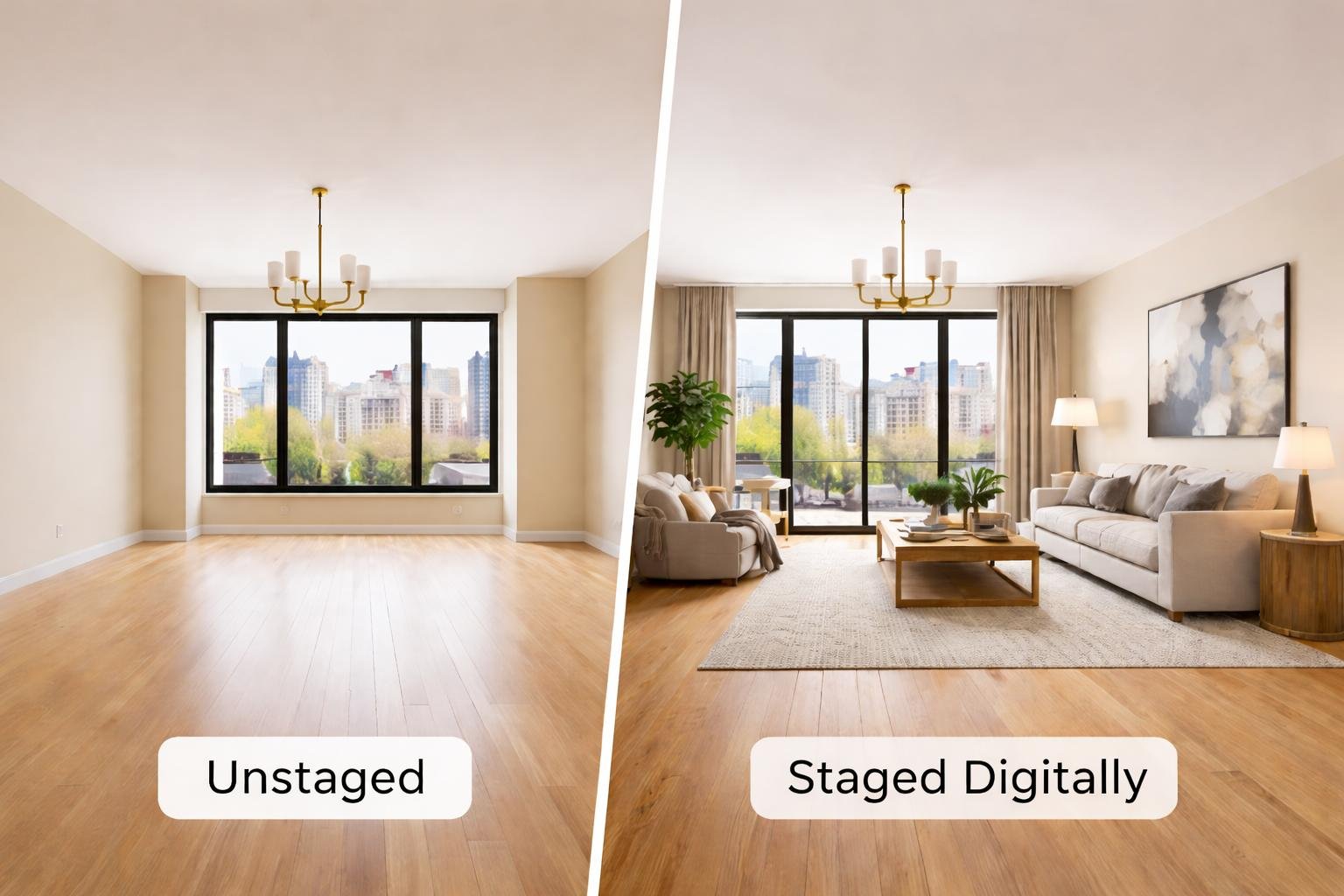
Introduction: Your Listing Photos Can Make or Break the First Impression
Imagine you are shopping for a home online. You click on a listing and see an empty living room with bare walls, a dull floor, and no furniture.
You may understand that the room has potential, but can you immediately imagine yourself living there?
Now picture the same room with a comfortable sofa, a stylish coffee table, warm lighting, and carefully selected décor. Suddenly, the space feels more inviting. You can visualize where you would relax, entertain guests, or spend time with your family.
That is the power of effective visual presentation.
Virtual staging for real estate marketing helps you present a property’s possibilities through digitally furnished photographs. Instead of physically moving furniture into a home, you add realistic furniture and décor to existing images.
For realtors, this can be a practical way to improve listing presentation, create social media content, and promote vacant or newly built properties.
Virtual staging is not a magic solution that guarantees a faster sale. However, when you use it strategically, it can become an important part of your marketing toolkit.
What Is Virtual Staging for Real Estate Marketing?
Virtual staging involves digitally adding furniture, artwork, rugs, lighting, and other design elements to a property photograph.
You start with an original image of a room. A virtual staging professional or AI-powered editing tool then creates a furnished version while preserving the room’s actual structure.
For example, an empty bedroom might be digitally furnished with:
-
A bed and bedside tables
-
A dresser
-
Curtains
-
Wall artwork
-
A floor rug
-
Decorative lighting
The finished image helps potential buyers understand how the room could be used.
How the Virtual Staging Process Works
A typical workflow includes the following steps:
-
Photograph the property using clear, high-quality images.
-
Select the rooms that would benefit from staging.
-
Choose a design style and furniture direction.
-
Create the virtually staged images.
-
Review the images for realism and accuracy.
-
Publish the approved images in your marketing materials.
The quality-control step is essential. Your staged images should show the property’s potential without changing its actual architecture or misleading buyers.

How Virtual Staging Improves Real Estate Listing Photography
Your listing photographs are often the first opportunity to communicate a property’s value. Virtual staging can help you make those photographs more informative and visually appealing.
Help Buyers Understand Empty Rooms
An empty room can be difficult to interpret, especially when buyers view it on a small mobile screen.
A 12-by-15-foot living room may look either spacious or awkward depending on the camera angle and the viewer’s imagination. Adding appropriately sized furniture gives buyers a practical reference point.
For example, a staged living room can show:
-
Where a sofa could fit
-
How much space remains for walking
-
Where a television might be placed
-
How the room connects with nearby areas
The objective is not to fill every corner. It is to help viewers understand the room’s purpose.
Create a More Inviting First Impression
A vacant property may look clean but emotionally neutral. Thoughtful staging introduces warmth and context.
You might use a neutral sofa, a textured rug, natural wood accents, and subtle artwork to create a welcoming atmosphere.
The design should support the property rather than overpower it. A small condominium, for instance, may benefit from a simple layout with compact furniture instead of a large sectional and multiple oversized accessories.
Show the Potential of Unused Spaces
Some rooms are difficult for buyers to interpret because their purpose is unclear.
A virtually staged image can demonstrate possible uses for:
-
An unfinished basement
-
An unusually shaped bedroom
-
An empty corner
-
A large landing area
-
A spare room
-
A compact home office
Be careful, however, not to suggest that a room has a use it cannot realistically support. A photograph should inspire buyers without creating false expectations.
Use Virtual Staging Across Your Listing Platforms
Virtual staging should not stop at your listing website. You can reuse approved images across several marketing channels.
Improve Your Main Listing Images
Start by choosing the rooms that matter most to a buyer’s decision.
In many properties, these may include:
-
Living room
-
Primary bedroom
-
Kitchen or dining area
-
Basement or family room
-
Home office
You do not necessarily need to stage every image. Focus on photographs that help viewers understand the property’s layout, lifestyle, and strongest features.
Use clear, well-composed original photographs. Virtual staging cannot fully correct poor lighting, distorted perspectives, or blurry images.
Create a Consistent Visual Story
Your listing should feel like one complete home, not a collection of unrelated design concepts.
If you use a contemporary style in the living room, choose complementary furniture and colors for the bedroom and dining area.
Consistency can help buyers move through the listing mentally, almost like taking a guided tour from one room to another.
Prepare Images for Different Channels
You may need different image dimensions for various platforms. Prepare versions suitable for:
-
Real estate listing websites
-
Instagram posts
-
Facebook content
-
Digital advertisements
-
Email newsletters
-
Property brochures
Always check the current requirements of each platform before publishing.
Use Before-and-After Images to Show Property Potential
Before-and-after content is a simple way to explain virtual staging to your audience.
Instead of only showing the finished image, display the original photograph beside the digitally staged version.

Show the Original and Staged Images Together
A side-by-side comparison allows viewers to see exactly what changed.
The original image communicates the property’s current appearance. The staged image illustrates one possible furniture and décor arrangement.
This format works particularly well for vacant homes, where the difference between an empty room and a furnished concept may be substantial.
Turn Comparisons Into Educational Content
You can use before-and-after images to explain:
-
How furniture affects the perception of space
-
Why room proportions matter
-
How design choices influence atmosphere
-
How an empty room can serve different purposes
For example, you could publish a post titled:
“How We Turned an Empty Basement Into a Comfortable Family Room Concept.”
The post can include the original image, the staged version, and a short explanation of the design decisions.
Use Before-and-After Content on Social Media
Consider creating:
-
Instagram carousel posts
-
Facebook image comparisons
-
Short video transitions
-
Property marketing reels
-
Educational YouTube Shorts
Keep the message simple and include a relevant call to action, such as inviting viewers to view the full listing or schedule a showing.
Use Virtual Staging to Strengthen Social Media Marketing
Social media gives you an opportunity to promote properties beyond traditional listing platforms.
However, simply uploading a property photograph may not be enough to capture attention. Virtual staging can give you more visual content to work with.
Create Attractive Property Posts
A staged photograph can serve as the main image in a social media post.
For stronger communication, combine the image with:
-
The property’s general location
-
A key feature
-
The asking price, where appropriate
-
A short description
-
A direct call to action
Avoid writing long captions that bury the important information. Your audience should understand the main message quickly.
Produce Short-Form Property Videos
You can turn several staged images into a short video showing a home’s different rooms.
For example, a 20-second video might include:
-
Three seconds of the exterior
-
Five seconds of the living room
-
Four seconds of the kitchen
-
Four seconds of the primary bedroom
-
Four seconds of the basement
The timing is illustrative. The right length depends on the platform, content, and audience.
You can also create a before-and-after transition that begins with an empty room and changes into a virtually furnished version.
Match the Design to the Target Buyer
Your staging style should reflect the property rather than follow every design trend.
Consider these examples:
-
Family home: Comfortable seating, practical storage, and warm colors
-
Modern condominium: Clean lines, compact furniture, and uncluttered décor
-
Luxury property: Refined materials, balanced layouts, and sophisticated styling
-
Starter home: Functional furniture and approachable design
-
New construction: Contemporary or neutral furnishings that highlight the finishes
You are not trying to please every viewer. You are helping the right audience understand the property.
Incorporate Virtual Staging Into Digital Advertising
Virtual staging can also support paid online campaigns.
Use Staged Images in Property Advertisements
A strong advertisement usually needs more than an attractive photograph. It should connect the image with a clear message.
For example:
Headline: “Explore This Bright Three-Bedroom Home”
Supporting Text: “Discover an inviting layout, practical living spaces, and a convenient location.”
Call to Action: “View Details” or “Schedule a Showing”
Use accurate information and make sure the landing page matches the advertisement.

Test Different Marketing Images
If you have multiple suitable photographs, test different versions of your advertising creative.
You might compare:
-
A virtually staged living room
-
A kitchen photograph
-
An exterior image
-
A before-and-after graphic
Track useful indicators such as:
-
Impressions
-
Click-through rate
-
Website visits
-
Inquiry volume
-
Showing requests
These metrics can help you identify which content attracts attention. They do not prove that virtual staging alone caused a sale because price, location, property condition, and market conditions also influence results.
Avoid Misleading Advertising
Never use virtual staging to hide serious property defects or misrepresent the home.
Do not digitally alter permanent features such as:
-
Windows
-
Doors
-
Walls
-
Stairs
-
Room dimensions
-
Kitchen cabinets
-
Built-in fixtures
Clearly identify digitally enhanced images according to applicable listing rules, platform policies, and professional requirements.
Market Vacant and New Construction Properties More Effectively
Virtual staging is particularly useful when a property does not contain furniture.
Make Vacant Homes Easier to Visualize
An empty home can feel unfinished in photographs, even when its construction and finishes are excellent.
Virtual staging can show buyers how the space might function after move-in.
For example, you could stage a vacant basement as:
-
A family entertainment room
-
A home gym
-
A playroom
-
A home office
-
A guest area
Only show uses that are realistic for the room’s size, layout, and condition.
Support New Construction Marketing
New construction properties often need visual marketing before buyers have furnished the home.
Virtual staging can help illustrate possible interior styles and furniture arrangements. It may be especially useful for model homes, inventory properties, and design concepts.
However, distinguish between a photograph of a completed home and a digitally created concept. Buyers should know whether the furniture, décor, and other features actually exist.
Create Multiple Design Concepts
You can show the same room in several styles, including:
-
Modern
-
Scandinavian
-
Coastal
-
Transitional
-
Contemporary luxury
This approach can help demonstrate flexibility, but too many variations may confuse buyers. Select a small number of relevant concepts and explain that they represent design possibilities.
Build a Practical Virtual Staging Workflow
A clear workflow helps you save time and reduce mistakes.
Step 1: Identify the Rooms That Need Staging
Review the property and decide which rooms need visual support.
Prioritize rooms that are:
-
Completely empty
-
Difficult to understand
-
Important to the buyer’s lifestyle
-
Visually unappealing
-
Suitable for a clear design concept
Step 2: Choose a Suitable Design Style
Consider the home’s architecture, neighborhood, price range, and intended audience.
A historic home may suit traditional or transitional décor, while a modern condominium may benefit from contemporary furniture.
Step 3: Review Every Image Carefully
Before publishing, check the following:
-
Is the furniture correctly scaled?
-
Are the windows and doors in their original locations?
-
Are the walkways realistic?
-
Are shadows and lighting believable?
-
Are the room dimensions preserved?
-
Does the furniture fit the architecture?
-
Are there any distorted objects?
One unrealistic detail can distract viewers from the entire image.
Step 4: Organize the Final Marketing Assets
Save approved images in clearly labeled folders. Prepare the appropriate versions for listing websites, social media, advertisements, and email campaigns.
This simple organizational step can prevent confusion when you manage several properties at once.
Step 5: Publish With Appropriate Disclosure
Make sure digitally enhanced photographs are labeled properly. Transparency helps protect your professional reputation and supports realistic buyer expectations.
Common Virtual Staging Mistakes to Avoid
Using Incorrect Furniture Proportions
A dining table that is too large can make a room appear smaller than it really is. Furniture should match the room’s dimensions and leave believable movement paths.
Changing the Architecture
Virtual staging should not redesign the property. Adding a window, moving a doorway, or changing the kitchen layout can mislead potential buyers.
Adding Too Much Décor
A crowded room may look impressive in an editing preview but feel unrealistic to viewers.
Use furniture and accessories selectively. The goal is to create clarity, not visual noise.
Using Different Styles in Every Room
A property with a glamorous living room, rustic bedroom, and ultra-minimalist kitchen may lack visual harmony.
Choose a coordinated design direction that supports the home’s overall character.
Failing to Disclose Digital Enhancements
Do not assume that viewers will automatically recognize virtual staging. Use clear labels and follow relevant rules.
Actionable Tips for Realtors Using Virtual Staging
Here are eight practical tips you can apply to your next listing:
-
Start with good photography. Use clear images with accurate perspectives.
-
Stage the most important rooms first. Focus on spaces that help buyers understand the home.
-
Use realistic furniture sizes. Keep walkways and room proportions believable.
-
Preserve architectural details. Do not alter doors, windows, walls, stairs, or built-in features.
-
Choose a consistent style. Make the entire listing feel connected.
-
Reuse images strategically. Adapt approved visuals for social media, email, and advertising.
-
Label digitally enhanced photographs. Maintain transparency with buyers.
-
Measure performance. Track inquiries, engagement, and showing requests where possible.
Conclusion: Make Every Listing Image Work Harder
Virtual staging can help you market homes more effectively by showing buyers how a property might look and function with furniture and décor.
It can improve vacant-room photography, support social media campaigns, strengthen digital advertisements, and provide useful visual concepts for new construction properties.
But successful virtual staging requires more than adding attractive furniture. You need accurate photography, realistic proportions, consistent design, and honest communication.
Think of your listing photographs as the front door to your marketing strategy. Before buyers walk into the property, your images invite them to take the first step.
Use virtual staging thoughtfully, combine it with strong marketing practices, and review your results over time. When you present a home’s potential clearly and professionally, you create more opportunities to capture attention and start meaningful conversations with buyers.
Frequently Asked Questions
1. Does virtual staging help attract more buyers online?
Virtual staging can make listing photographs more informative and visually appealing, which may encourage viewers to explore a property further. However, buyer interest also depends on factors such as price, location, condition, and market competition.
2. Can realtors use virtual staging for social media marketing?
Yes. You can use virtually staged images in carousel posts, short videos, before-and-after comparisons, advertisements, and educational content. Make sure the images accurately represent the property and include appropriate disclosures.
3. Should you virtually stage every room in a property?
No. Prioritize rooms that are empty, difficult to interpret, or important to the buyer’s lifestyle. Your budget, property type, and marketing objectives should determine how many images you stage.
4. Can virtual staging hide problems in a home?
Virtual staging should not be used to conceal structural damage, defects, poor condition, or permanent property features. The digitally enhanced image should support accurate marketing rather than create a misleading impression.
5. How can you determine whether virtual staging is effective?
Track listing views, inquiries, showing requests, social media engagement, and advertising performance. Compare results carefully because many factors—including pricing, location, photography, and market conditions—can influence the outcome.